
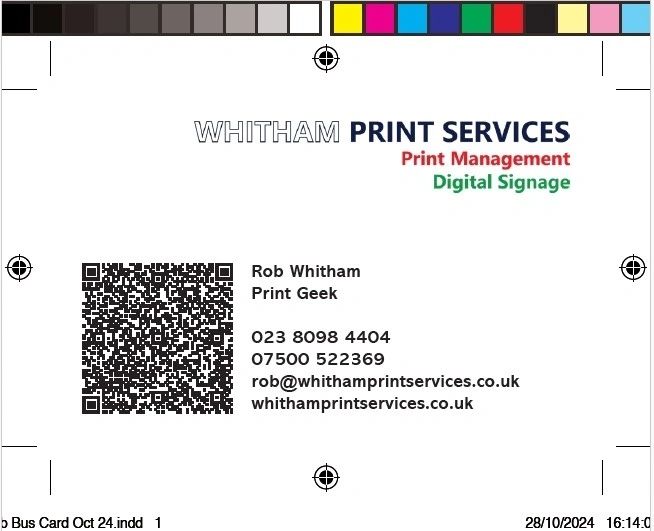
When it comes to producing high-quality printed materials, the artwork you supply plays a crucial role in the final result. Whether you're printing brochures, business cards, banners, or packaging, well-prepared artwork ensures a smooth production process and a professional outcome. Here’s a comprehensive guide on how to create good artwork for print.
1. Understand Print Specifications
Before you begin designing, it's essential to know the specific requirements of your print provider. These often include:
- Bleed: Typically 3mm beyond the trim edge. Bleed ensures there are no unwanted white edges.
- Trim Size: The final size of the printed product after cutting.
- Safe Zone: Keep important text and images at least 5mm inside the trim edge to avoid them being cut off.
- Resolution: Use a resolution of 300dpi (dots per inch) for all images to ensure sharpness in print.
- Colour Mode: Convert your artwork to CMYK (Cyan, Magenta, Yellow, Black) rather than RGB. Printers use CMYK, and RGB colours may not print accurately.
2. Use the Right Software
Professional design software is key for creating print-ready artwork. Some industry standards include:
- Adobe InDesign: Ideal for multi-page documents and layout-heavy designs.
- Adobe Illustrator: Great for vector artwork such as logos and illustrations.
- Adobe Photoshop: Best for image manipulation and raster-based artwork.
Avoid using word processors (like Microsoft Word) or presentation software (like PowerPoint), as they don't offer the control or quality needed for print.
3. Choose the Correct File Format
Always supply artwork in high-quality, print-ready formats. Commonly accepted formats include:
- PDF (Preferred): High-quality PDFs with embedded fonts and images are ideal for printing.
- TIFF or JPEG: Use for single images; ensure 300dpi and no compression for best results.
- AI/EPS: Useful for vector files, especially when scalability is important.
Make sure to flatten layers and outline fonts where possible to avoid printing issues.
4. Pay Attention to Typography
Typography can make or break your printed piece. Keep these tips in mind:
- Legibility: Choose clean, easy-to-read fonts.
- Font Size: Ensure text is large enough to be readable at print size.
- Kerning and Leading: Adjust spacing between letters and lines for better readability.
- Outlining Fonts: Convert fonts to outlines when saving your final file to prevent font issues during printing.
5. Image Quality Matters
Poor image quality stands out in print. Follow these best practices:
- High Resolution: Use images at 300dpi at actual print size.
- Avoid Compression: Save images in lossless formats when possible.
- Colour Consistency: Ensure colours look consistent across different images and match your brand palette.
6. Include Bleed and Crop Marks
Bleed ensures your design extends beyond the trim line, preventing unprinted edges. Crop marks show where the document should be trimmed. Most professional design software allows you to include these during export.
7. Proof Your Artwork
Before sending to print, always proof your design:
- Spellcheck: Obvious but often missed.
- Visual Check: Ensure all elements are correctly aligned and nothing is too close to the edge.
- Print a Test Copy: If possible, print at home to see how it looks at actual size.
8. Communicate with Your Print Provider
If you're unsure about any part of the process, speak to your printer. They can often provide templates, advice, and feedback on your artwork to ensure it's suitable for production.
9. Keep it Simple and Clean
Good print design is clear and uncluttered. Focus on a strong layout, consistent branding, and a clear message. Less really is more.
10. Stay Organised
Organise your files properly:
- Name Files Clearly: Include version numbers and relevant descriptions.
- Package Files: If using InDesign, use the 'Package' function to include all fonts and linked images.
- Keep Backups: Always save a backup of your final artwork and working files.
Final Thoughts
Creating artwork for print doesn’t need to be complicated, but attention to detail is essential. By following these steps and understanding the technical requirements, you’ll avoid common pitfalls and ensure a smooth print process — with results you’ll be proud to share. Whether you’re working with a print partner like Whitham Print Services or managing projects in-house, good artwork preparation makes all the difference.